How do I validate which Matrox card and Firmware version is present in my Cablecast or Flex server?
Last Updated:February 7, 2026
Applies to
Cablecast SX2HD, SXLEHD, SXSD
All Flex servers
Answer
Go in the Tray area. If your server uses a Matrox card, expanding the tray area will reveal the Matrox X.Info icon.
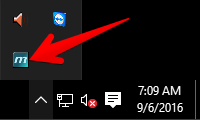
Open the Matrox X.Info tray app.
In X.Info, select the Display Information About --> Hardware drop down.
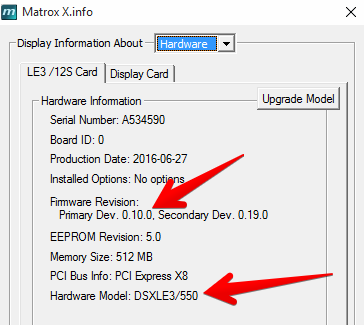
The Firmware versions are identified as Primaryand Secondary Dev.
The Matrox card type is identified as Hardware Model.