Embedding Video on Third-party Websites
Cablecast makes it easy to share your content through your Internet Channel, where viewers can browse your schedule, watch VOD content, explore video collections, and more. In some cases, though, you may want to embed your video player directly on a different website.
Tip: Using your Internet Channel for sharing content is generally easier and requires less ongoing maintenance than managing embedded players on external sites.
Limitations of Embedding
Before you embed, keep the following in mind:
Embedding a VOD program does not include chapters or PDFs attached to the Show Record.
Metadata such as crew, description, and run time is not passed with the embed code. For advanced embedding that includes this level of detail, you may need to use the Cablecast API.
Embedded players may require specific ports to be open on your network to be accessible externally.
Embed Code - Live Stream
This requires an active live feed using the Cablecast Live encoder (sold separately) and configured in your system.
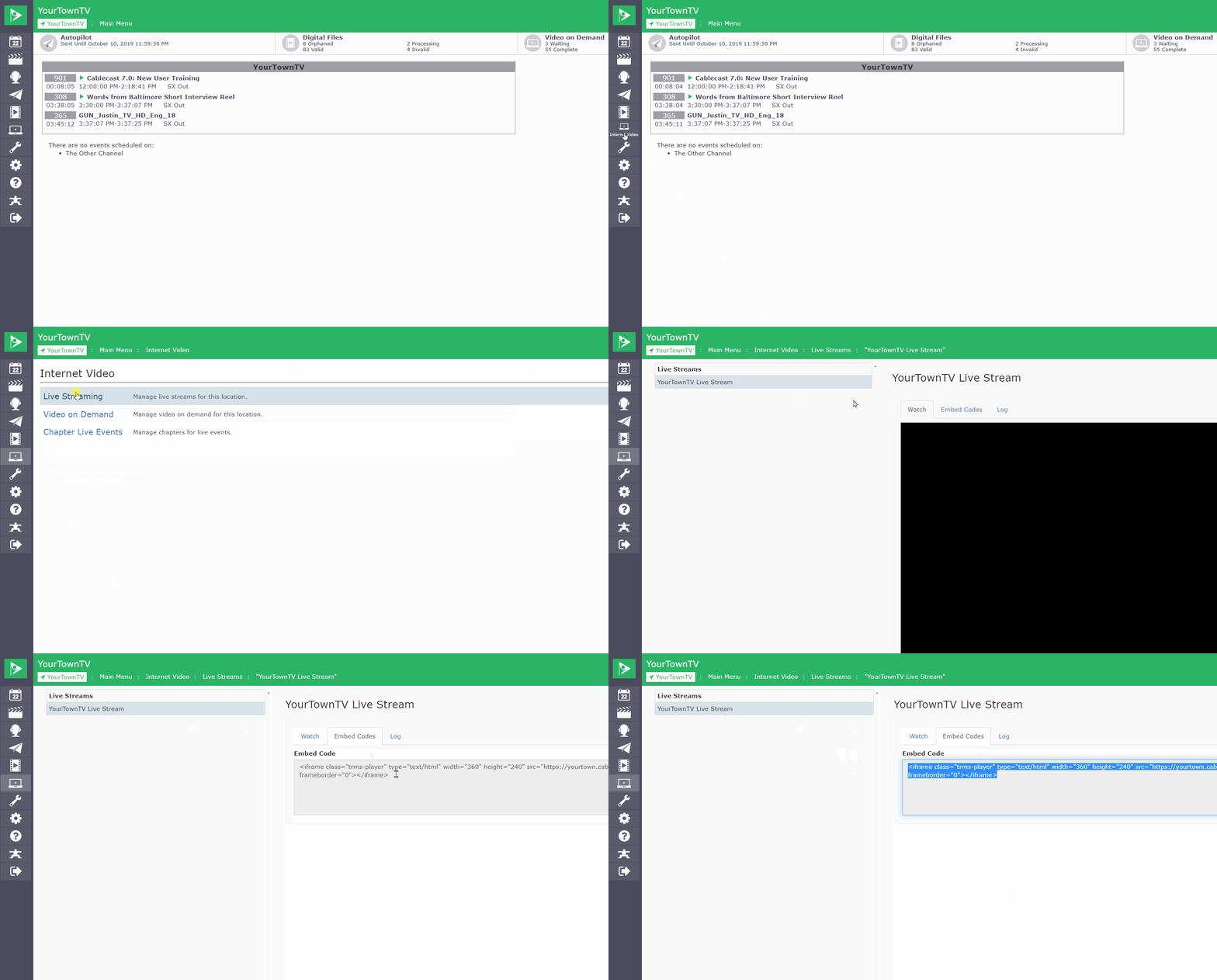
Open the left-hand menu and go to Internet Video.
Select Live Streaming.
Select the channel you want to embed.
Select the Embed Codes tab.
Copy your embed code.
The embed code includes width and height iframe parameters. You can adjust these to change the size of the player — just maintain the original aspect ratio.
Embed Code - VOD Program
This requires VOD to be enabled and configured in your system.
Open the left-hand menu and go to Internet Video.
Select Video on Demand.
Select the video you want to embed. Note: If you don't see the video you're looking for, it may not be marked as VOD-enabled. You can enable it in the Show Record.
Select the Embed tab.
Copy your embed code.
You also have access to a direct link to the MP4 file on your VOD server. This can be useful for providing direct download links or building a custom player.
Summary
Cablecast supports embedding both live streams and VOD programs on external websites using iframe embed codes. Keep in mind that embedded players do not carry over chapters, attached PDFs, or show metadata. For most sharing needs, your Internet Channel is the simpler option.
